Turn LaTeX maths into a handwritten page
MyMath Ink guide · Published
The equations are already typed in LaTeX. Paste them and get a handwritten page back, with fractions, roots and matrices set the way TeX sets them, instead of writing every equation out again.
- LaTeX equations or a .tex file
- MyMath Ink
- Handwritten page
- PDF or PNG
- Free
- No account
- Runs in your browser
Typed into the editor
# Kinematics with constant acceleration

For a constant acceleration $a$, the velocity and position are

$$
v(t) = v_0 + a t, \qquad x(t) = x_0 + v_0 t + \frac{1}{2} a t^2
$$

Eliminating $t$ gives the time-free equation

$$
v^2 = v_0^2 + 2a\,(x - x_0)
$$

The Gaussian integral and a rotation matrix:

$$
\int_{-\infty}^{\infty} e^{-x^2}\,dx = \sqrt{\pi}, \qquad R(\theta) = \begin{pmatrix} \cos\theta & -\sin\theta \\ \sin\theta & \cos\theta \end{pmatrix}
$$

$$
\sum_{n=1}^{\infty} \frac{1}{n^2} = \frac{\pi^2}{6}
$$The handwritten page
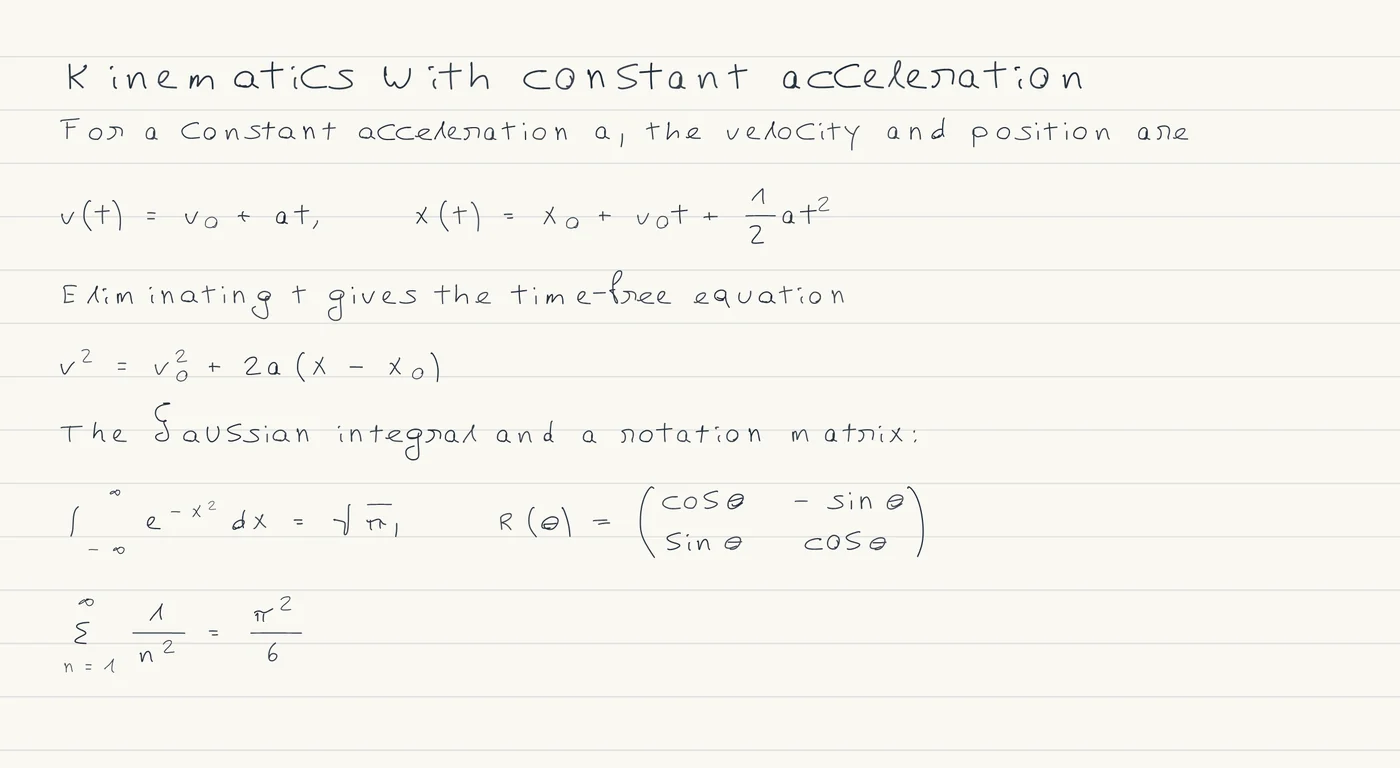
Typed LaTeX in, handwriting out
Most tools that come up for LaTeX and handwriting go the other way: they read a photo of handwriting and give you LaTeX. This is the opposite job. The maths is already typed, in lecture notes, a problem sheet or your own working, and you want it on a handwritten page to read, print or keep in a notes app.
A handwriting font cannot do this. A font writes characters in a row, so fractions, roots, limits and matrices fall apart. MyMath Ink lets MathJax lay the maths out exactly as TeX would, then replaces each typeset character with a handwritten one.
How to do it
- Open MyMath Ink on Note sheet. The sheet starts with a worked example: select all of it and type or paste over it. For a whole .tex file, use File, then Import a note instead (see below).
- Write text as ordinary lines, start a heading with # and a space, put inline maths between single dollar signs, and put a displayed formula between two lines that hold only $$. The handwritten page appears a moment after you stop typing.
- Check the page. Guide, beside the zoom, lays the typeset maths under the handwriting so you can compare them. Then choose Export and Download PDF for the whole sheet, or Download page PNG for one page.
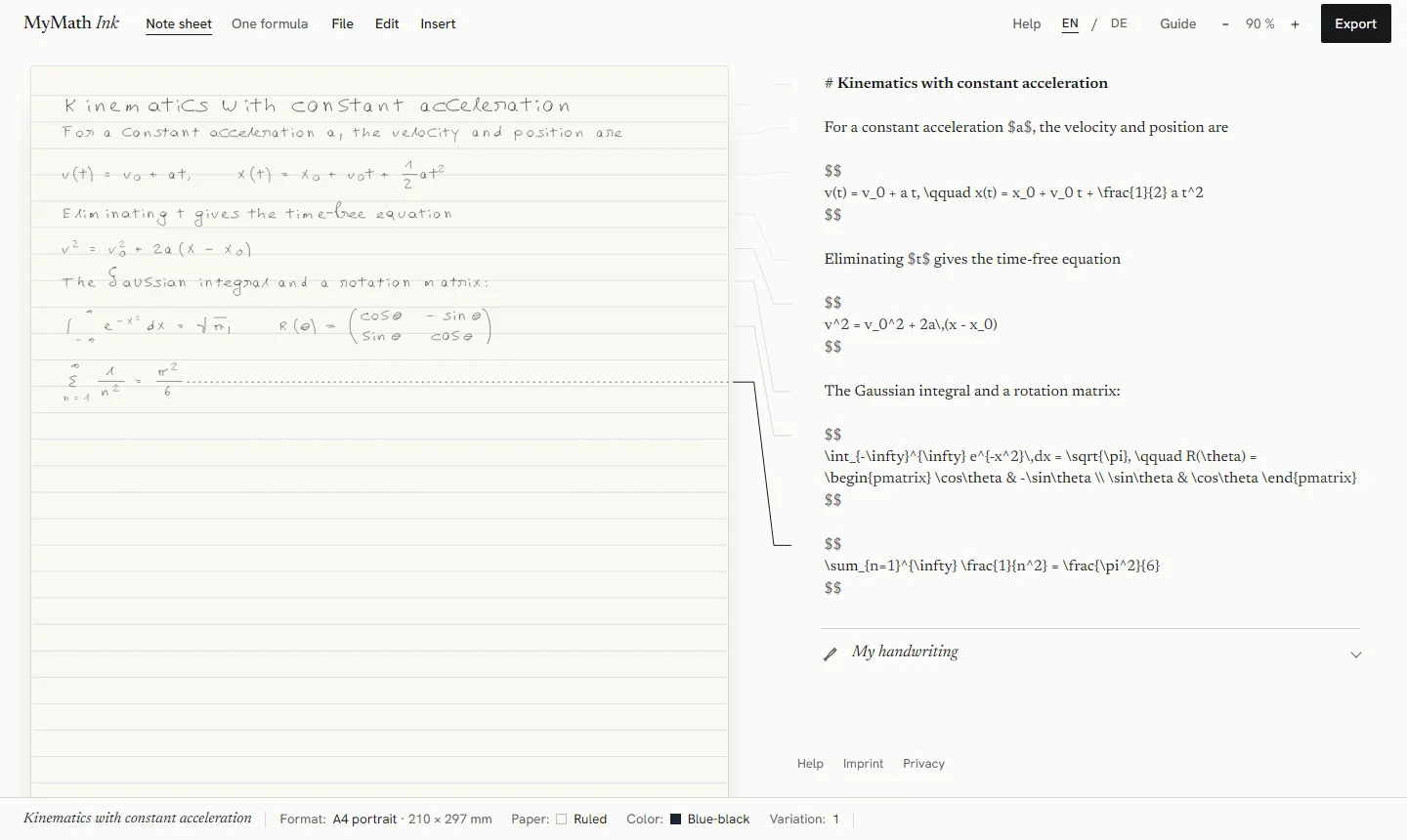
What works
- Inline maths in $…$ and displayed maths in $$…$$. For a literal dollar sign in prose, write \$.
- What MathJax 3 typesets from TeX: fractions, roots, sub- and superscripts, sums, integrals and limits, Greek letters, accents such as \vec, \dot and \bar, growing brackets, and matrices such as pmatrix. The example above uses most of these.
- Headings and paragraphs around the maths. A sheet has one heading style, so # and ## look the same.
- A .tex file or pasted LaTeX, up to 200 kB, through File, then Import a note. Sections become headings, and display environments such as align become formulas. Lists and text formatting keep their text.
Limits
- This is not a LaTeX compiler. Document classes, packages, bibliographies, figures and tables are not supported. Commands from packages, such as \qty and \dv from physics or \bm, are named as errors rather than guessed.
- In an imported .tex file, your own \newcommand macros are not expanded, \input files are not read, and \ref and \cite are written as their keys. The import dialog lists each of these.
- The built-in hand does not have every symbol yet. Missing today: ℏ (\hbar), angle brackets (\langle, \rangle), \dagger, \otimes, \forall, \Rightarrow, \mathbb{R}, \equiv, \ll, \|, the degree sign (^\circ), \epsilon (\varepsilon works), \phi (\varphi works), \hat and \tilde. They are drawn as outlined boxes, and the bar along the foot of the workspace names them before you export.
- A sheet holds up to 40 pieces of content (headings, paragraphs and formulas) of up to 600 characters each.
- In the PDF, prose and headings are searchable text; formulas are drawn and cannot be searched or copied.
If your LaTeX comes from a chat answer, with \( \) and \[ \] around it, see the ChatGPT and Claude guide.
Whose handwriting it is
The page is written in a built-in hand. Under Appearance, Handwriting style offers Original, Neat, Technical and Casual; the styles change letters, digits and basic symbols, while Greek letters and maths symbols stay in the original hand.
My handwriting, under the editor, lets you draw characters yourself. Each character you draw replaces the built-in one, and every character you skip keeps the built-in hand, so the page is in your handwriting only as far as you have drawn it. Your characters stay in this browser.
Free, no account, in your browser
MyMath Ink is free and has no account, sign-in or payment. Your note text, formulas, imported files and handwriting are processed in your browser and are not uploaded. Notes are saved in this browser on this device, so keep a backup file of anything that matters.
Loading the website is still an ordinary web request, and anonymous usage is counted without cookies. The details are in the privacy notice.
Try it
The studio opens with a worked example, so you can see the handwriting before you type anything.
Open MyMath Ink