Turn ChatGPT or Claude maths into a handwritten page
MyMath Ink guide · Published
Already have the solution or derivation in a chat? Paste the answer, Markdown and LaTeX included, instead of copying every line and equation onto paper by hand.
- ChatGPT or Claude answer
- Markdown + LaTeX
- MyMath Ink
- Handwritten page
- Free
- No account
- Runs in your browser
Copied from the chat
## Range of a projectile

A ball is launched from the ground with speed \(v_0\) at an angle \(\theta\) above the horizontal. Ignore air resistance.

### 1. Split the initial velocity

\[
v_x = v_0\cos\theta, \qquad v_y = v_0\sin\theta
\]

### 2. Find the time of flight

The height is \(y(t) = v_y t - \tfrac{1}{2} g t^2\). Setting \(y = 0\) for \(t > 0\) gives

\[
t_f = \frac{2 v_0 \sin\theta}{g}
\]

### 3. Multiply by the horizontal speed

\[
R = v_x t_f = \frac{2 v_0^2 \sin\theta \cos\theta}{g} = \frac{v_0^2 \sin 2\theta}{g}
\]

using \(2\sin\theta\cos\theta = \sin 2\theta\).

**Result:** the range is largest when \(\sin 2\theta = 1\), that is at \(\theta = \pi/4\), where \(R_{\max} = v_0^2/g\).The handwritten page
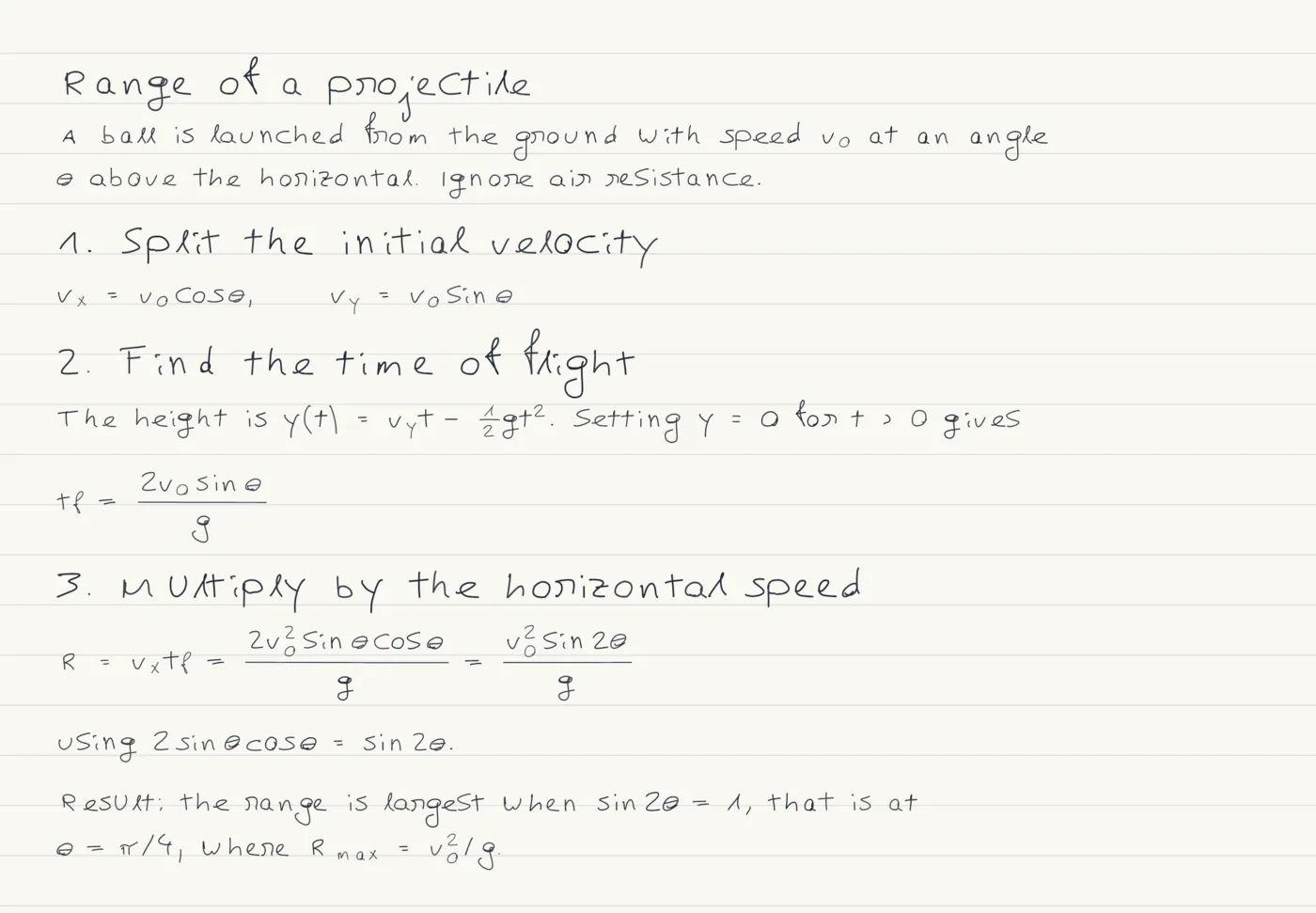
Why this exists
MyMath Ink was built by a physics student. Longer derivations often started as a ChatGPT or Claude answer, and the tedious part was copying every line and equation onto paper by hand. So the tool does the copying: paste the answer, check the page, export it.
How to do it
- Under the answer in ChatGPT or Claude, use the copy button: it copies the Markdown with the LaTeX in it. Selecting the text with the mouse can copy the rendered symbols instead; if the maths arrives as plain symbols, use the copy button or ask for the answer in Markdown with LaTeX maths.
- Open MyMath Ink and choose File, then Import a note. Paste the answer and press Replace example, or Add to sheet if the sheet already holds your own work. Read as can stay on Automatic.
- The dialog says how it read the text and lists anything it simplified. Close it and compare the page with the answer: Guide, beside the zoom, lays the typeset maths under the handwriting.
- Check the maths itself, then choose Export and Download PDF for the whole sheet, or Download page PNG for one page.
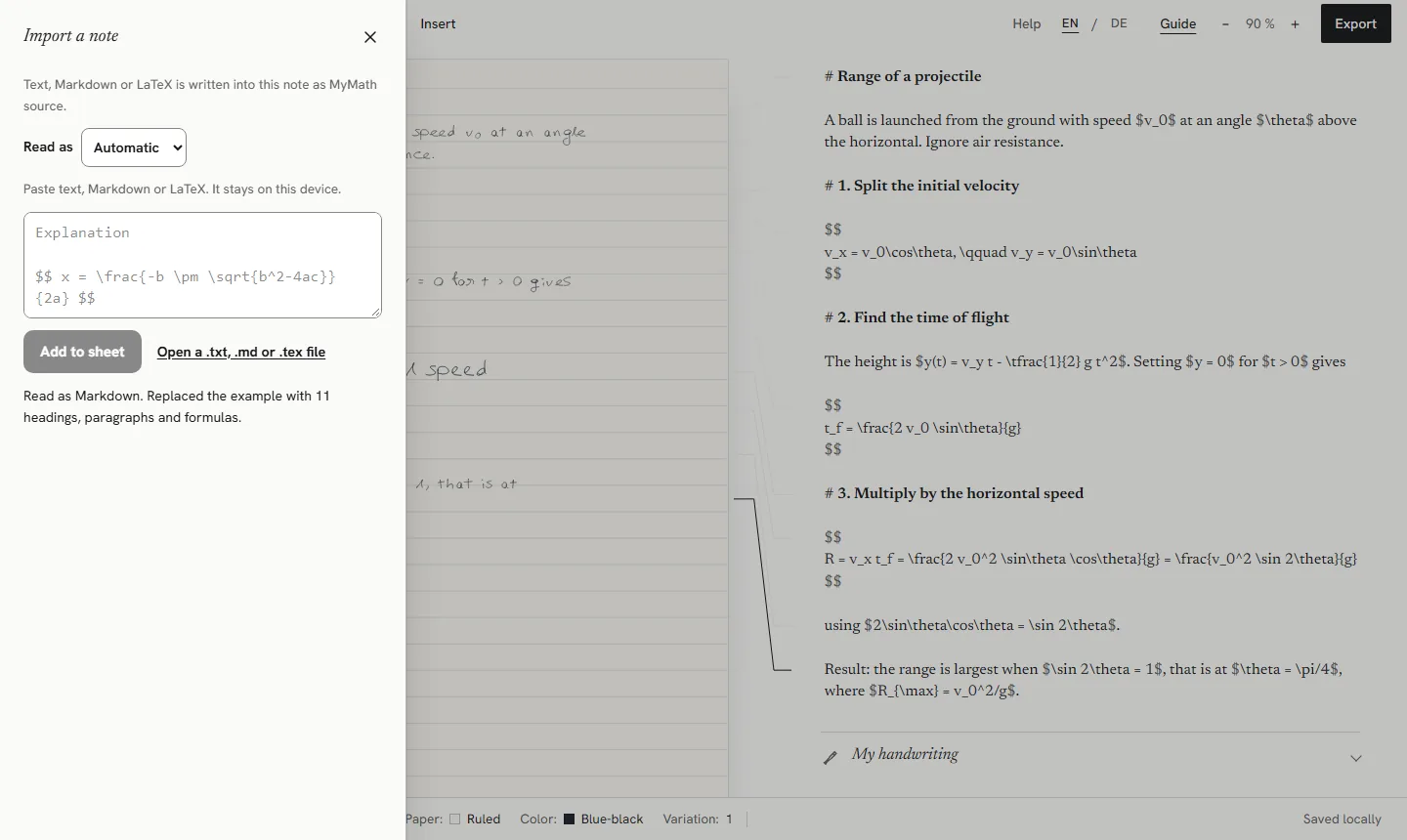
What happens to the answer
- \(…\) becomes $…$, and \[…\] becomes a formula on lines of its own. The LaTeX inside is not changed.
- ## and ### headings become headings. A sheet has one heading style, so the level is not kept.
- Bold and italics become plain text: **Result:** is written as Result:.
- Numbered steps keep their numbers as text. A note under the editor says that lists are not part of MyMath source and the number is written as it is.
- Bullet points lose the bullet, and each item becomes a paragraph of its own.
- Tables become one paragraph per row, and code formatting becomes plain text. The dialog says so.
Check the maths, and follow your course rules
The handwriting copies what the assistant wrote, mistakes included. An AI answer can contain a wrong step or a result that only looks right, so work through each step yourself before you rely on it.
Follow your course's rules on AI tools. Use an AI answer to understand a method, verify every step, and do not hand in AI-written work as your own where that is not allowed. MyMath Ink removes the copying, not the thinking: handwriting changes how the notes look, not who did the work.
Limits
- Answers often write degrees as ^\circ. The degree sign is not in the built-in hand yet, so it is drawn as an outlined box; use radians or the word degrees instead.
- Commands from LaTeX packages, such as \qty or \dv from physics, are named as errors. Ask for standard LaTeX, or edit them.
- A sheet holds up to 40 pieces of content. A longer answer is cut at that point, and the dialog says how much was kept.
Other missing symbols, and the LaTeX that works, are listed in the LaTeX guide.
Whose handwriting it is
The page is written in a built-in hand. Under Appearance, Handwriting style offers Original, Neat, Technical and Casual; the styles change letters, digits and basic symbols, while Greek letters and maths symbols stay in the original hand.
My handwriting, under the editor, lets you draw characters yourself. Each character you draw replaces the built-in one, and every character you skip keeps the built-in hand, so the page is in your handwriting only as far as you have drawn it. Your characters stay in this browser.
Free, no account, in your browser
MyMath Ink is free and has no account, sign-in or payment. Your note text, formulas, imported files and handwriting are processed in your browser and are not uploaded. Notes are saved in this browser on this device, so keep a backup file of anything that matters.
Loading the website is still an ordinary web request, and anonymous usage is counted without cookies. The details are in the privacy notice.
Try it
The studio opens with a worked example, so you can see the handwriting before you type anything.
Open MyMath Ink