Student workflow comparison
Best Note-Taking Apps for Math and Physics Students in 2026
Goodnotes, Obsidian, OneNote, Overleaf, Typora, Notion and our own MyMath Ink, sorted by the kind of mathematical work you actually do. There is no ranking, no score and no winner.
- Published
- Methodology and sources
Maths and physics notes are unusual. In one week you may need prose, equations, multi-line derivations, matrices, diagrams, lecture slides as PDFs and pages written by hand, and you may want to search all of it a year from now. No single app is equally good at every one of those.
So the useful question is not “which note app has the most features?” It is “what kind of mathematical work am I trying to capture?” This page sorts seven tools by that question, and it has no overall winner.
Pick by the work, not by the feature list.The whole comparison in one line
Start here
Quick picks
Find your workflow, then read that tool’s section. These are use-case summaries, not a ranking.
Live handwritten lectures and PDF annotation
Ink stays the centre of the notebook, and slides are marked up in place.
Local Markdown and linked long-term knowledge
Plain Markdown files in a folder you own, linked with backlinks.
Mixed typed and handwritten general notes
Typed text and ink share one page, and Microsoft tools come along.
- Made by us
Typed Markdown and LaTeX turned into handwritten-looking pages
Turns maths you have already typed into handwritten-looking pages.
Formal LaTeX papers and collaboration
Full LaTeX in the browser, with real-time co-editing.
Focused local Markdown with maths
One quiet Markdown editor that renders as you type.
Course and project organisation
Pages and blocks that organise modules, deadlines and notes.
Not sure which row is yours? The decision map below starts from how you work instead.
Method
How we compared these tools
The comparison rests on three things: the vendors’ current official documentation, which is linked in each section and was checked on 30 September 2026; what maths and physics coursework actually demands; and our direct knowledge of MyMath Ink, which we make.
We did not run a controlled hands-on test of every competitor, and this page does not pretend to have. Where a feature depends on platform, plan or subscription we say so instead of guessing. We leave out prices, ratings and scores: they change, or they would be invented. Products change too, so check the linked pages before you commit to one.
Seven decision factors run through every section
- Handwriting and stylus workflow.
- Mathematical notation and LaTeX.
- Markdown and typed technical notes.
- PDF and lecture-material workflow.
- Long-term organisation and who owns the files.
- Collaboration.
- Fit for derivations, proofs and technical study notes.
Decision map
Which workflow are you in?
I write my maths by hand
I type technical Markdown notes
I need a formal LaTeX document
I need to organise modules and projects
I already have Markdown or LaTeX and want handwritten-looking pages
Input and output
From handwriting to workspace
Where each tool sits on the kinds of work it is built for. Position shows the kind of work, not quality: there is no score.
- GoodnotesMainly handwriting; it also takes typed text.
- ObsidianMainly typed technical notes; links between notes give it some workspace character.
- Microsoft OneNoteHandwriting and typed notes on the same page.
- MyMath InkTyped source goes in, handwritten-looking pages come out.
- OverleafTyped LaTeX goes in, a typeset document comes out.
- TyporaTyped technical notes.
- NotionMainly an organised workspace; pages take typed notes and equations.
- Main way of working
- Also supported
- Typed input becomes a different output
Side by side
The seven tools in one table
| Tool | Best fit | Main input style | Maths and LaTeX | Storage and organisation | Main trade-off |
|---|---|---|---|---|---|
| Goodnotes | Handwriting lectures; marking up slides and PDFs | Stylus handwriting; also typing and PDF annotation | Handwritten ink. Math Assist and AI for Math can help with equations (Math Assist: iOS only, English notebooks) | Notebooks inside the app, on Apple, Android, Windows and web; plan-dependent | Equations are ink, not typed source; some maths features depend on platform and plan |
| Obsidian | A durable, linked web of typed notes you keep as files | Typed Markdown | MathJax with LaTeX notation: $…$ inline, $$…$$ as display blocks | Plain-text Markdown files in a local folder; links, backlinks and a graph; optional Sync and Publish | Handwriting is not its core workflow |
| Microsoft OneNote | Notes that mix typing, handwriting and school-supplied Microsoft tools | Typing and ink on the same page | Ink to Math turns handwriting into typed notation; Math Assistant can solve and graph | Microsoft’s notebook model, not a folder of plain Markdown | Advanced maths features vary by app version and subscription |
| MyMath InkOur product | Maths that is already typed and should become a handwritten-looking study page | Typed MyMath source (a Markdown and LaTeX dialect), or an imported .txt, .md or .tex file | TeX maths in $…$ and $$…$$, laid out by MathJax 3; the ink is replaced with handwriting | Notes saved in your browser, with backup files; no account; not a knowledge base | One narrow job: no PDF annotation, no sync, no collaboration |
| Overleaf | Reports, problem sets, theses and shared LaTeX papers | Typed LaTeX, in a Code Editor or a Visual Editor | Full LaTeX typesetting, with templates and bibliography tools | Online projects you share with collaborators | Produces typeset documents, not a handwriting-first notebook |
| Typora | Clean typed Markdown notes with maths, without a larger system around them | Typed Markdown with live rendering | MathJax: $$…$$ blocks, and inline maths once it is switched on in preferences | Local files with a file tree and an outline panel | No handwriting, and little linking or project structure |
| Notion | Organising a degree: modules, assignments and structured course information | Typed pages built from blocks | Inline and block equations, rendered with KaTeX (a large subset of LaTeX, not all of it) | Workspaces of pages | Not handwriting-first; less natural for long derivations |
Scroll the table sideways to see every column.
The tools
The seven tools in detail
The order is not a ranking: it moves from handwriting-first tools through typed-note systems to formal typesetting and organisation, with the tool we make in the middle so it does not sit at either end.
Goodnotes
Handwriting-first notebooks and PDF annotation
- Handwriting
- PDF markup
- Strong for
- Handwritten lectures
- Annotating slides and PDFs
- Sharing notebooks
- Trade-off
- Equations are ink, not typed source, and some maths features depend on platform and plan.
- Choose it if
- You take most of your lectures directly with an Apple Pencil or another stylus, or you annotate slides and PDFs all day.
Goodnotes is built around writing by hand. Its own materials describe notebooks you can write, type and sketch in, with PDF annotation as a core feature, and versions for Apple devices, Android, Windows and the web (what each includes depends on the plan). For a lecture where derivations arrive faster than anyone can type LaTeX, or slides you mark up as the lecturer talks, that is the natural shape of the tool.
Handwritten equations stay ink unless you convert them. Goodnotes has Math Assist, which can recognise a handwritten equation and offer solving strategies; its support pages say it is available on iOS only and in English-language notebooks. Its AI for Math feature accepts handwritten problems or typed LaTeX. These are helpers, not a typed-source workflow: what you keep is still a notebook page.
Collaboration exists, including real-time sharing of notebooks, with the more advanced options depending on the plan. The trade-off is that your equations are ink rather than typed source, so they do not paste straight into a LaTeX document or a Markdown file, and some maths features differ by platform.
Obsidian
Local Markdown files and linked notes
- Typed Markdown
- Local files
- Strong for
- Notes you keep as files
- Links, backlinks and a graph
- MathJax maths
- Trade-off
- Handwriting is not its core workflow, and the link web is something you build and maintain.
- Choose it if
- You type your notes and want long-term, linked, file-based knowledge you control.
Obsidian keeps notes as Markdown-formatted plain text files in a folder on your computer, which it calls a vault. That is its central argument: the notes are ordinary files you can open in other editors, back up however you like and keep for as long as you want. It is local-first and private by default, with optional Sync and Publish services on top.
Maths uses MathJax and LaTeX notation: single dollar signs for inline formulas and double dollar signs for display blocks, so a derivation is a sequence of $$…$$ blocks between your prose. Notes can link to each other, with backlinks and a graph view, which suits a degree where a definition from one module keeps turning up in three others.
Handwriting is not its core workflow, so a student who works out equations mainly with a stylus has a different need. The link web is also something you build and maintain: it pays off through habit, not by itself. If your goal is a durable web of local Markdown notes, Obsidian solves a broader problem than MyMath Ink does.
Microsoft OneNote
Typed and handwritten notes on the same page
- Ink and typing
- Strong for
- Typing and ink on one page
- Ink to Math conversion
- Fits Microsoft-based courses
- Trade-off
- Advanced maths features vary by version and subscription, and it is not a folder of plain Markdown.
- Choose it if
- You mix typing and handwriting in general-purpose notes, or your university already runs on Microsoft tools.
OneNote mixes typed text, ink and other content on one page, which suits notes that are partly typed and partly handwritten. Microsoft documents Ink to Math, which converts a handwritten equation into typed notation, and Math Assistant, which works with equations to solve them with steps and to graph functions.
Availability varies by app version, platform and subscription, so do not assume every advanced maths feature is free or present on your device; check the Microsoft pages against the OneNote you will actually use. The trade-off is that OneNote works in Microsoft’s notebook model rather than a folder of plain Markdown, and its maths features are built around its own equation tools instead of a source file other tools can read. It is less aligned with a plain-Markdown, local-file workflow than Obsidian or Typora.
MyMath Ink
Typed Markdown and LaTeX, rendered as handwritten-looking pages
- Typed in
- Handwritten out
- Strong for
- Markdown and LaTeX in, handwritten-looking pages out
- Free, no account, runs in your browser
- PDF and PNG export
- Trade-off
- One narrow job: no sync, collaboration or PDF annotation, and formulas are not searchable in the PDF.
- Choose it if
- Your material already exists as Markdown or LaTeX, and what you want at the end is a handwritten-looking page.
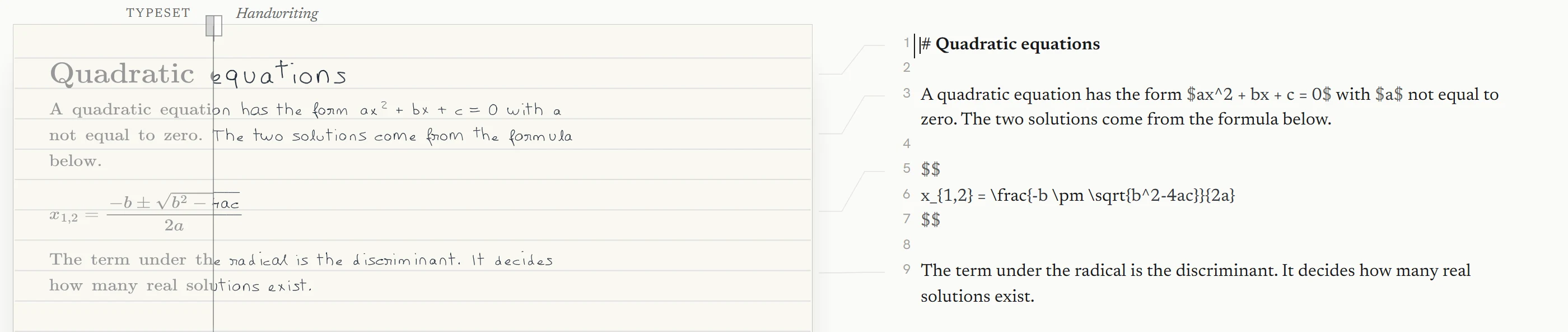
MyMath Ink does one narrow job: it takes typed Markdown and LaTeX and renders it as handwritten-looking pages. It is not a general knowledge-management system, a PDF annotation tool, an infinite handwritten notebook, a collaborative LaTeX editor or an AI summariser, and it does not replace Goodnotes. The narrowness is why it is in this comparison. Set next to the others:
- Goodnotes: write the maths by hand.
- Obsidian and Typora: keep typed Markdown and LaTeX-style technical notes.
- Overleaf: produce formal LaTeX documents.
- MyMath Ink: take maths that is already typed and turn it into handwritten-looking study pages.
You write in MyMath source, a small dialect of Markdown and LaTeX: three heading levels, paragraphs, simple lists two levels deep, and formulas between single or double dollar signs, including aligned derivations. MathJax 3 lays out the maths, so spacing, fractions and brackets follow TeX, and only the ink is replaced with handwriting. You can also import a .txt, .md or .tex file.
# Quadratic formula

The two roots of $ax^2+bx+c=0$ are

$$
x_{1,2} = \frac{-b \pm \sqrt{b^2-4ac}}{2a}
$$
A note can run over several pages (A4, A5 or US Letter). There are four built-in handwriting styles, Original, Neat, Technical and Casual, and several paper styles. You export every page as one PDF, the current page as a PNG, or the ink alone as a transparent image, and you can copy the source. If you want your own hand, you draw characters in the browser: each one replaces the built-in character, and every character you skip keeps the built-in hand, so a page is in your handwriting only as far as you have drawn it.
It is free, needs no account and runs in your browser: note text, formulas, imported files and handwriting are processed there and not uploaded. Notes are saved in that browser on that device, so keep a backup file of anything that matters. Loading the website is still an ordinary web request, and anonymous usage is counted without cookies; the privacy notice has the details.
Its limits are real. It is not full Markdown or a LaTeX document, so tables, images and emphasis stay as the characters you typed. A sheet holds up to 80 pieces of content of 600 characters each, and an imported file is read up to 200 kB. Characters outside the handwriting set are drawn as an outlined box. The PDF carries your prose and headings as searchable text, but formulas are drawn and are not searchable. There is no sync, collaboration or PDF annotation. Help lists the current limits in full.
Worked examples: Turn ChatGPT or Claude maths into a handwritten page, Turn LaTeX maths into a handwritten page, and Turn Markdown study notes into handwritten pages.
Overleaf
Collaborative online LaTeX
- LaTeX
- Collaboration
- Strong for
- Full LaTeX typesetting
- Real-time sharing and commenting
- Templates and bibliographies
- Trade-off
- It produces typeset documents, not a handwriting-first notebook, and some collaboration features depend on the plan.
- Choose it if
- Your output is a formal document, or you write LaTeX with collaborators.
Overleaf is an online LaTeX editor with a Code Editor and a Visual Editor, a large set of templates, bibliography and citation workflows, and real-time sharing, editing and commenting. Its own material makes the case for LaTeX for complex maths, tables and technical content, and the result is a typeset document, usually a PDF.
That makes it the tool for lab reports, problem sets you hand in, theses and papers written with other people. The trade-off is that it produces formal typeset documents, not a handwriting-first notebook, and it is not built for catching a lecture as it happens. Some collaboration features depend on the plan. For collaborative papers and formal LaTeX documents, use Overleaf.
Typora
A focused Markdown editor with live rendering
- Typed Markdown
- Local files
- Strong for
- Live rendering, no split preview
- MathJax maths
- File tree and outline panel
- Trade-off
- No handwriting, little linking or project structure, and it is paid after a trial according to its site.
- Choose it if
- You want quiet, local, typed Markdown with maths and little else.
Typora is a desktop Markdown editor that shows formatted text as you type, with no separate preview pane. It handles headings, lists, tables and diagrams, and it supports maths through MathJax: $$ blocks for display formulas, and inline maths once you switch it on in the preferences. Notes are files on your computer, with a file tree and an outline panel for moving around a folder of them. According to its site it is a paid app after a trial, so check the current terms.
It suits someone who wants to type clean Markdown notes with maths without building a larger knowledge system. The trade-off is that it has no handwriting workflow and much less linking or project structure than Obsidian or Notion.
Notion
Pages, blocks and workspaces for organising a degree
- Workspace
- Strong for
- Modules, assignments and deadlines
- Inline and block equations
- Flexible pages built from blocks
- Trade-off
- Not handwriting-first, and KaTeX covers only a subset of LaTeX: align is unsupported, aligned works.
- Choose it if
- Your problem is organisation: modules, projects and coursework, with maths as one part of each page.
Notion is a flexible workspace of pages built from blocks, described by its makers around documents, projects and knowledge bases. For a degree, that means module pages, assignment lists, deadlines and structured course information in one place.
It supports inline and block equations, rendered with KaTeX, which covers a large subset of LaTeX but not every capability. Notion’s help names one example that matters for derivations: align is not supported, while aligned is. Check the KaTeX function list for the commands you use. Notion is not handwriting-first, and long mathematical derivations are less natural there than in a Markdown or LaTeX editor.
In short
Which workflow fits you?
- You write equations by hand in lectures and mark up slides: Goodnotes, or OneNote if you also type a lot in Microsoft’s ecosystem.
- You want a lasting, linked archive of typed notes that stays as files: Obsidian, or Typora if you prefer something simpler.
- You hand in or co-write formal documents: Overleaf.
- You need one place for modules, assignments and deadlines: Notion, alongside a tool that suits your maths.
- You type your maths and want handwritten-looking pages: MyMath Ink.
Two tools are often better than one
Some workflows combine tools instead of choosing one. For example, you keep typed notes in Obsidian or Typora as Markdown with LaTeX maths, then import the passages you want as a handwritten study page in MyMath Ink. The dollar-sign maths delimiters are the same in all three, and the import lists anything it had to simplify. The same route works for a Markdown and LaTeX answer copied from an AI chat. MyMath Ink itself does not summarise or solve anything; it changes how the page looks.
Also worth a look
Honourable mention: Zettlr
If your work is research-heavy, with a long reading list and a thesis to cite it in, Zettlr is worth a look. It is free and open source, privacy-first, with no forced cloud sync or telemetry, and its files stay on your computer. It supports citations from CSL JSON or BibTeX libraries, including Zotero. We have not compared its maths workflow in detail here.
Questions
Frequently asked questions
What is the best note-taking app for math students?
There isn’t one, because “math notes” covers different jobs. Handwriting lectures and annotating slides points to Goodnotes or OneNote. Typed, linked notes you keep as files point to Obsidian or Typora. Formal write-ups and shared papers point to Overleaf. Organising a whole degree points to Notion. Start from the work you actually do, then pick the tool for that.
Is Goodnotes or OneNote better for handwritten maths?
It depends on where the rest of your work lives. Goodnotes is built around handwriting and PDF annotation, and its Math Assist feature (iOS only, English notebooks) works on handwritten equations. OneNote mixes typed text and ink on one page, and its Ink to Math converts a handwritten equation into typed notation; which of its maths features you get depends on your app version and subscription. If you write most of your maths with a stylus and want the handwriting to stay the centre of the notebook, look at Goodnotes first; if you also type a lot or your university runs on Microsoft tools, look at OneNote.
Is Obsidian good for math and physics notes?
For typed notes, yes. Obsidian renders maths with MathJax and LaTeX notation, and its notes are Markdown files in a folder you control, linked to each other with backlinks. It is not a handwriting tool, so if your derivations start on paper or on a tablet, pair it with something else or type them up.
Can I use LaTeX in a note-taking app?
Several tools take LaTeX-style maths. Obsidian and Typora render it through MathJax, Notion renders equations with KaTeX (a large subset of LaTeX, not all of it), and Overleaf is a full LaTeX editor. Goodnotes’ AI for Math can take typed LaTeX as input for solving. MyMath Ink reads LaTeX maths in its source and imports .tex notes, but it is not a LaTeX editor: document classes, packages and bibliographies are outside what it does.
Is Notion good for mathematical notes?
It is good for organising the surroundings of the maths (modules, assignments, reading lists, deadlines) and it supports inline and block equations. Because those use KaTeX, check that the commands you rely on exist; Notion’s own help points out that the align environment is not supported while aligned is. For long derivations, a Markdown or LaTeX editor is usually more comfortable.
What should I use if I type my notes but want them to look handwritten?
This is the narrow case MyMath Ink was made for, and we make it, so weigh that. You keep your notes as typed Markdown and LaTeX, and it renders them as handwritten-looking pages you can export as PDF or PNG. It does not recognise handwriting, it does not turn a page into something you can annotate, and it does not summarise or solve anything. If you simply want to write by hand, a handwriting app is the better tool.
Should physics students type or handwrite notes?
We are not aware of evidence we could cite that settles this for every student, so we won’t claim one. The practical answer depends on how fast the lecture goes, how many equations and diagrams it contains, whether you will need to search the notes months later, and whether you are solving problems (where paper or a stylus is often quicker) or documenting a result (where typed, searchable text is often easier to keep). Many people do both, and the tools above combine well for that.
Conclusion
Pick by the work, not by the feature list. Handwriting-first work belongs in Goodnotes or OneNote, typed and linked notes in Obsidian or Typora, formal write-ups in Overleaf, and the structure around a degree in Notion. Two tools together are often better than one that tries to do everything.
MyMath Ink covers a smaller case than any of them: maths that is already typed and should end up on a handwritten-looking page. If that is your case, it is free, needs no account and runs in your browser.
Open MyMath Ink